viernes, 8 de mayo de 2020

FILAS EN UNA SOLA COLUMNA, SQL-T


WITH ORDERS
 AS
 (
 select OrderId = 1,ProductId = 100
 union select 1,158
 union select 1,234
 union select 2,125
 union select 3,105
 union select 3,101
 union select 3,212
 union select 3,250
 )

 select distinct
       orderid
   ,REPLACE(LTRIM(REPLACE((  SELECT ' ' + CAST(ProductId as varchar)
       FROM ORDERS d
       WHERE d.OrderId = o.OrderId
       FOR XML PATH('')
   ),' ','')),' ', ', ') as Products
 from ORDERS o


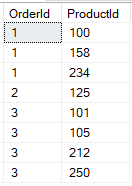
RESULTADO:


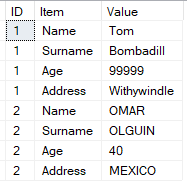
PIVOT DINÁMICO USANDO CTE, WITH


-- ===================================================================
-- Autor:                 MANUEL OMAR OLGUÍN HERNÁNDEZ
-- Fecha:                 2020 MAYO 8
-- Versión:                1.0
-- Requerimiento:   PIVOT TABLE FORMED USING XML
-- Descripcion:            PIVOT TABLE sin necesidad de especificar explicitamente los nombres de las columnas
-- ================================================================
Select ID = 1, 'Tom' as Name ,'Bombadill' as Surname ,99999 as Age ,'Withywindle' as Address
UNION ALL
Select ID = 2, 'OMAR' as Name ,'OLGUIN' as Surname ,40 as Age ,'MEXICO' as Address


;with SampleCTE
as
(
Select ID = 1, 'Tom' as Name ,'Bombadill' as Surname ,99999 as Age ,'Withywindle' as Address
UNION ALL
Select ID = 2, 'OMAR' as Name ,'OLGUIN' as Surname ,40 as Age ,'MEXICO' as Address
)
Select A.ID, c.*
From SampleCTE A
Cross Apply ( values (cast((Select A.* for XML RAW) as xml))) B(XMLData)
Cross Apply (
                    Select       Item = a.value('local-name(.)','varchar(100)') ,Value = a.value('.','varchar(max)')
                    From         B.XMLData.nodes('/row') as C1(n)
                    Cross Apply C1.n.nodes('./@*') as C2(a)
                    Where a.value('local-name(.)','varchar(100)') not in ('ID','ExcludeOtherCol')
                    ) C


jueves, 20 de febrero de 2020

Rellenar Celdas con un Valor Anterior


tenemos una tabla como la siguiente:


queremos rellenar los Valor NULL con el último valor anterior conocido.


ejecutamos la siguiente query


-- CUENTA EL CAMPO QUE TIENE NULLS

    SELECT ID, v
        ,Cuenta=COUNT(v) OVER (ORDER BY ID)
    FROM #X


Este es el truco, va contando el número de valores encontrados:


ya solamente se necesita un SELECT MAX Particionado por la columna "Cuenta".


SELECT ID, v, s=MAX(v) OVER (PARTITION BY cuenta)
FROM
(
    SELECT ID, v
        ,Cuenta=COUNT(v) OVER (ORDER BY ID)
    FROM #X
) a
ORDER BY ID;


source:


lunes, 21 de enero de 2019

AGRUPACIÓN POR UN CAMPO, ÚNICAMERNTE CUANDO ÉSTE ES CONSECUTIVO ENTRE SI


CÓMO AGRUPAR POR NODO ÚNICAMENTE CUANDO LOS NODOS ESTÁN CONSECUTIVOS ENTRE SI


CÓMO AGRUPAR POR NODO ÚNICAMENTE CUANDO LOS NODOS ESTÁN CONSECUTIVOS ENTRE SI


NODO   ID_GENERAL    ID_AGRUPADO_X_NODO      RESTA ( ID_GENERAL-ID_AGRUPADO_X_NODO)

 X           1             1                        0
 X           2             2                        0
 X           3             3                        0
 Y           4             1                        3
 Y           5             2                        3
           6             3                        3
           7             1                        6
           8             2                        6
           9             1                        8


SALUDOS

viernes, 11 de enero de 2019

Leer Excel desde SQL Server


descargar Access Database Engine X64.exe

https://www.microsoft.com/en-us/download/details.aspx?id=13255


instalarlo dentro del server con el siguiente parámetro   /passive

C:\Users\desacop>C:\DW\AccessDatabaseEngine_X64.exe /passive


sp_configure 'show advanced options', 1;
RECONFIGURE;
GO
sp_configure 'Ad Hoc Distributed Queries', 1;
RECONFIGURE;
GO

RECONFIGURE;

EXEC master.dbo.sp_MSset_oledb_prop N'Microsoft.ACE.OLEDB.12.0', N'AllowInProcess', 1
GO
EXEC master.dbo.sp_MSset_oledb_prop N'Microsoft.ACE.OLEDB.12.0', N'DynamicParameters',


ejecutar:


DECLARE @cmd VARCHAR(255)
SET @cmd = 'bcp "My Select Query Here" queryout "My Excel File Path Here" -U linkuser -P linkuser01 -c'
Exec xp_cmdshell @cmd

para ver posibles errores


The setting can be applied as follows
Open SQL Server Configuration Manager -> Services -> SQLServer service.
Right click and choose properties.
Go to advanced tab and append -g512; to startup parameters property and it will resolve


SELECT * INTO Data_dq


FROM OPENROWSET('Microsoft.ACE.OLEDB.12.0',
    'Excel 12.0; Database=C:\BASURA\reporte.xls', [R$]);
GO


SELECT * INTO XLImport3 FROM OPENDATASOURCE('Microsoft.Jet.OLEDB.4.0',
'Data Source=C:\BASURA\reporte.xls;Extended Properties=Excel 8.0')...[R]


SELECT * INTO XLImport4 FROM OPENROWSET('Microsoft.Jet.OLEDB.4.0',
'Excel 8.0;Database=E:\OOlguinRemate@gmail.com\PROYECTOS\11.- DESARROLLOS\Excel a SQL\reporte.xls', [R$])


SELECT * INTO XLImport5 FROM OPENROWSET('Microsoft.Jet.OLEDB.4.0',
'Excel 8.0;Database=E:\OOlguinRemate@gmail.com\PROYECTOS\11.- DESARROLLOS\Excel a SQL\reporte.xls', 'SELECT * FROM [R$]')


martes, 17 de abril de 2018

Caracter de escape


Cómo se implementa un caracter de escape en una consulta con filtro
-- Los corchetes son caracteres especiales, por eso hay que omitirlos


      ,[ColumnName]
      ,…
  FROM [DatabaseName].[dbo].[TableName]
  WHERE TextData like '%![GroupBy1!]%' ESCAPE '!'